
[Test Lab 기본 구성]
RE5 = BB#1
RE4 = BB#2
RE6= L2
1. VLAN 생성
- VLAN 10 / VLAN 20
2. VLAN 포트 할당 (Trunk Mode)
3. LACP 포트 생성
4. RSTP 모드 구성으로 L2에서 ALT 확인
- Root-Bridge = BB#1
5. VSTP
- VLAN 10 Root-Bridge = BB#1
- VLAN 20 Root-Bridge = BB#2
6. VLAN L3 Interface 생성
- VLAN 10 = 192.168.10.0/24
- VLAN 20 = 192.168.20.0/24
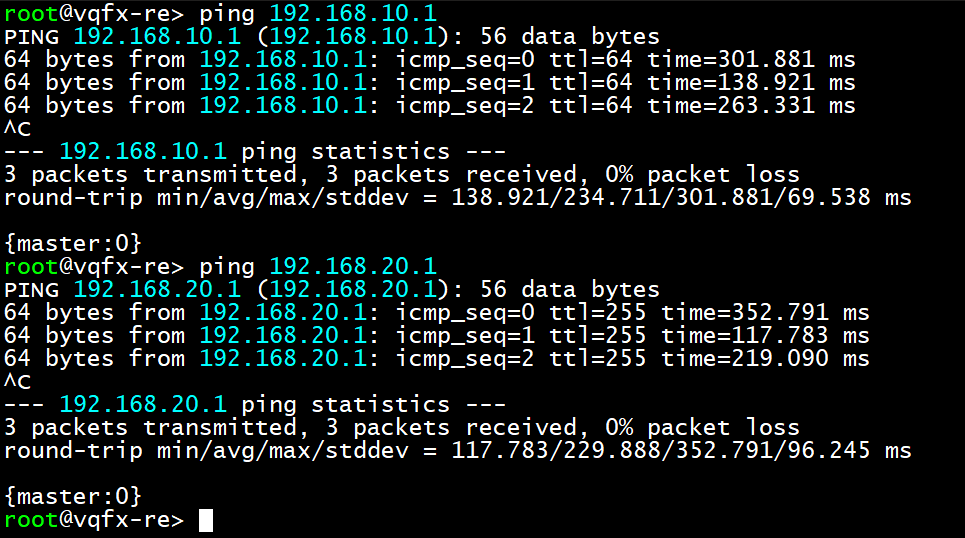
7. VRRP 구성
- VRRP VID 10 Master = BB#1
- VIP = 192.168.10.1
- VRRP VID 20 Master = BB#2
- VIP = 192.168.20.1
- BB#1 RSTP 기준
set system host-name BB-1
set interfaces xe-0/0/0 unit 0 family ethernet-switching interface-mode trunk
set interfaces xe-0/0/0 unit 0 family ethernet-switching vlan members VLAN10
set interfaces xe-0/0/0 unit 0 family ethernet-switching vlan members VLAN20
set chassis aggregated-devices ethernet device-count 1
set interfaces xe-0/0/3 ether-options 802.3ad ae0
set interfaces xe-0/0/4 ether-options 802.3ad ae0
set interfaces ae0 aggregated-ether-options lacp active
set interfaces ae0 unit 0 family ethernet-switching interface-mode trunk
set interfaces ae0 unit 0 family ethernet-switching vlan members VLAN10
set interfaces ae0 unit 0 family ethernet-switching vlan members VLAN20
set interfaces irb unit 10 family inet address 192.168.10.2/24 vrrp-group 10 virtual-address 192.168.10.1
set interfaces irb unit 10 family inet address 192.168.10.2/24 vrrp-group 10 priority 150
set interfaces irb unit 10 family inet address 192.168.10.2/24 vrrp-group 10 preempt
set interfaces irb unit 10 family inet address 192.168.10.2/24 vrrp-group 10 accept-data
set interfaces irb unit 20 family inet address 192.168.20.3/24 vrrp-group 20 virtual-address 192.168.20.1
set interfaces irb unit 20 family inet address 192.168.20.3/24 vrrp-group 20 preempt
set interfaces irb unit 20 family inet address 192.168.20.3/24 vrrp-group 20 accept-data
set protocols rstp bridge-priority 0
set protocols rstp interface all
set vlans VLAN10 vlan-id 10
set vlans VLAN10 l3-interface irb.10
set vlans VLAN20 vlan-id 20
set vlans VLAN20 l3-interface irb.20
set vlans default vlan-id 1
- VSTP 기준
set protocols vstp interface all
set protocols vstp vlan 10 bridge-priority 0
set protocols vstp vlan 20 bridge-priority 4k
set protocols vstp vlan all
- BB#2 RSTP 기준
set system host-name BB-2
set interfaces xe-0/0/1 unit 0 family ethernet-switching interface-mode trunk
set interfaces xe-0/0/1 unit 0 family ethernet-switching vlan members VLAN10
set interfaces xe-0/0/1 unit 0 family ethernet-switching vlan members VLAN20
set chassis aggregated-devices ethernet device-count 1
set interfaces xe-0/0/3 ether-options 802.3ad ae0
set interfaces xe-0/0/4 ether-options 802.3ad ae0
set interfaces ae0 aggregated-ether-options lacp active
set interfaces ae0 unit 0 family ethernet-switching interface-mode trunk
set interfaces ae0 unit 0 family ethernet-switching vlan members VLAN10
set interfaces ae0 unit 0 family ethernet-switching vlan members VLAN20
set interfaces irb unit 10 family inet address 192.168.10.3/24 vrrp-group 10 virtual-address 192.168.10.1
set interfaces irb unit 10 family inet address 192.168.10.3/24 vrrp-group 10 priority 100
set interfaces irb unit 10 family inet address 192.168.10.3/24 vrrp-group 10 accept-data
set interfaces irb unit 20 family inet address 192.168.20.2/24 vrrp-group 20 virtual-address 192.168.20.1
set interfaces irb unit 20 family inet address 192.168.20.2/24 vrrp-group 20 priority 150
set interfaces irb unit 20 family inet address 192.168.20.2/24 vrrp-group 20 accept-data
set protocols rstp bridge-priority 4k
set protocols rstp interface all
set vlans VLAN10 vlan-id 10
set vlans VLAN10 l3-interface irb.10
set vlans VLAN20 vlan-id 20
set vlans VLAN20 l3-interface irb.20
set vlans default vlan-id 1
- VSTP 기준
set protocols vstp interface all
set protocols vstp vlan 10 bridge-priority 4k
set protocols vstp vlan 20 bridge-priority 0
set protocols vstp vlan all
- L2
set interfaces xe-0/0/0 unit 0 family ethernet-switching interface-mode trunk
set interfaces xe-0/0/0 unit 0 family ethernet-switching vlan members VLAN10
set interfaces xe-0/0/0 unit 0 family ethernet-switching vlan members VLAN20
set interfaces xe-0/0/1 unit 0 family ethernet-switching interface-mode trunk
set interfaces xe-0/0/1 unit 0 family ethernet-switching vlan members VLAN10
set interfaces xe-0/0/1 unit 0 family ethernet-switching vlan members VLAN20
set interfaces irb unit 10 family inet address 192.168.10.100/24
set protocols rstp interface all
set vlans VLAN10 vlan-id 10
set vlans VLAN10 l3-interface irb.10
set vlans VLAN20 vlan-id 20
set vlans default vlan-id 1
- L2에서 VLAN 10의 Root는 xe-0/0/0(BB#1) / VLAN 20의 Root는 xe-0/0/1(BB#2)
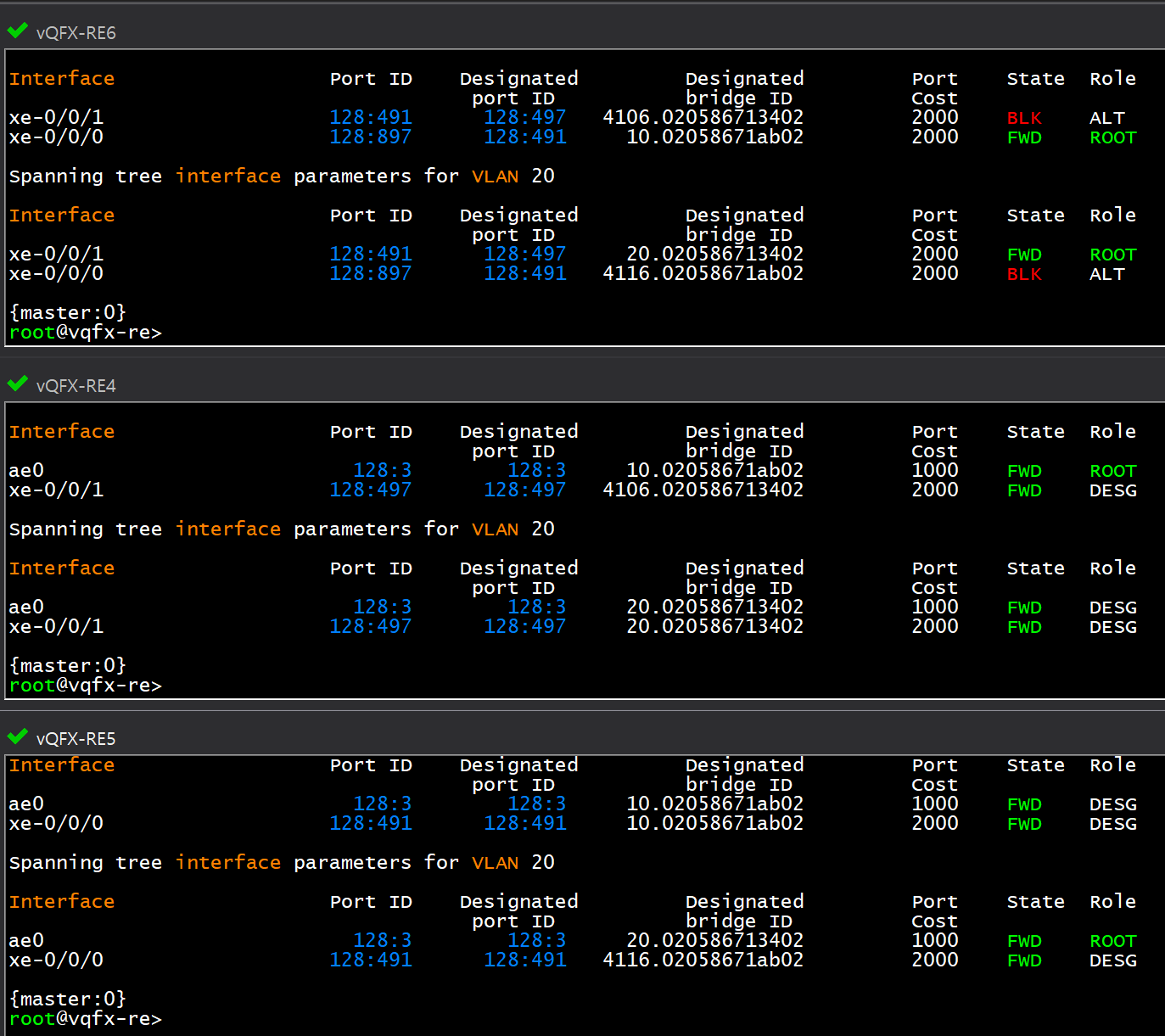

CISCO와의 연동으로 VSTP 테스트
- BB#1과 L2는 동일하며, R7(CISCO BB#2) 설정 후 확인
- BB#2(CISCO)
spanning-tree mode rapid-pvst
spanning-tree extend system-id
spanning-tree vlan 10 priority 4096
spanning-tree vlan 20 priority 0
!
interface Port-channel1
switchport trunk encapsulation dot1q
switchport mode trunk
!
interface Ethernet0/0
switchport trunk encapsulation dot1q
switchport mode trunk
channel-group 1 mode active
!
interface Ethernet0/1
switchport trunk encapsulation dot1q
switchport mode trunk
channel-group 1 mode active
!
interface Ethernet0/2
switchport trunk encapsulation dot1q
switchport mode trunk
!
interface Ethernet0/3
!
interface Vlan10
ip address 192.168.10.3 255.255.255.0
vrrp 10 ip 192.168.10.1
!
interface Vlan20
ip address 192.168.20.2 255.255.255.0
vrrp 20 ip 192.168.20.1
vrrp 20 priority 150
!
최종 확인
- BB#1


- BB#2

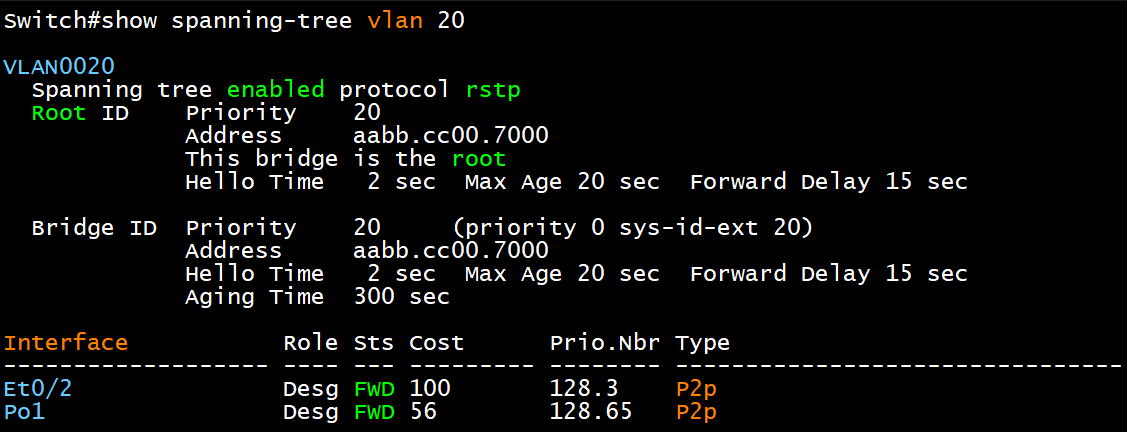

- L2
= 동일하게 VLAN 별로 Root Bridge를 다르게 잡은 상태 확인

'IT > ㄴ HPE & Juniper' 카테고리의 다른 글
| [JN0-650] Interior Gateway Protocols (IGPs) - OSPFv3 (0) | 2025.12.25 |
|---|---|
| [JN0-650] Interior Gateway Protocols (IGPs) - OSPFv2 (0) | 2025.12.25 |
| Juniper SRX VPN IPSec 기본 구성 routed-base (0) | 2025.09.18 |
| Juniper SRX 기본 Lab 구성(IP 설정 / Zone 지정 / 내부 서비스 허용 / SNAT / DNAT) (0) | 2025.09.17 |
| Junos BGP #5 기초 구성해보기 (no-export) (1) | 2025.09.08 |