
왼쪽 SRX
- Tunnel Interface 생성 및 zone 할당 -
set interfaces st0 unit 0 family inet address 10.255.255.1/30
set security zones security-zone vpn interfaces st0.0
- ike Phase 1 -
set security ike proposal ike-prop1 authentication-method pre-shared-keys
set security ike proposal ike-prop1 dh-group group14
set security ike proposal ike-prop1 authentication-algorithm sha-256
set security ike proposal ike-prop1 encryption-algorithm aes-256-cbc
set security ike proposal ike-prop1 lifetime-seconds 3600
set security ike policy ike-pol1 mode main
set security ike policy ike-pol1 proposals ike-prop1
set security ike policy ike-pol1 pre-shared-key ascii-text "$9$yTdeMLdb2GDkxNDk.P3nylK"
set security ike gateway gw ike-policy ike-pol1
set security ike gateway gw address 123.0.203.1
set security ike gateway gw external-interface ge-0/0/1
- IPSec Phase 2 -
set security ipsec proposal ipsec-prop1 protocol esp
set security ipsec proposal ipsec-prop1 authentication-algorithm hmac-sha1-96
set security ipsec proposal ipsec-prop1 encryption-algorithm aes-128-cbc
set security ipsec proposal ipsec-prop1 lifetime-seconds 3600
set security ipsec policy ipsec-pol1 proposals ipsec-prop1
set security ipsec vpn vpn-to-R bind-interface st0.0
set security ipsec vpn vpn-to-R ike gateway gw
set security ipsec vpn vpn-to-R ike ipsec-policy ipsec-pol1
set security ipsec vpn vpn-to-R establish-tunnels immediately
- 원격지 내부 대역을 Remote Tunnel Interface로 라우팅 -
set routing-options static route 172.31.0.0/24 next-hop 10.255.255.2
오른쪽 SRX
- Tunnel Interface 생성 및 zone 할당 -
set interfaces st0 unit 0 family inet address 10.255.255.2/30
set security zones security-zone vpn interfaces st0.0
- ike Phase 1 -
set security ike proposal ike-prop1 authentication-method pre-shared-keys
set security ike proposal ike-prop1 dh-group group14
set security ike proposal ike-prop1 authentication-algorithm sha-256
set security ike proposal ike-prop1 encryption-algorithm aes-256-cbc
set security ike proposal ike-prop1 lifetime-seconds 3600
set security ike policy ike-pol1 mode main
set security ike policy ike-pol1 proposals ike-prop1
set security ike policy ike-pol1 pre-shared-key ascii-text "$9$0zW11ESvWxwYoreYoJGq.0BI"
set security ike gateway gw ike-policy ike-pol1
set security ike gateway gw address 203.0.123.1
set security ike gateway gw external-interface ge-0/0/0
- IPSec Phase 2 -
set security ipsec proposal ipsec-prop1 protocol esp
set security ipsec proposal ipsec-prop1 authentication-algorithm hmac-sha1-96
set security ipsec proposal ipsec-prop1 encryption-algorithm aes-128-cbc
set security ipsec proposal ipsec-prop1 lifetime-seconds 3600
set security ipsec policy ipsec-pol1 proposals ipsec-prop1
set security ipsec vpn vpn-to-R bind-interface st0.0
set security ipsec vpn vpn-to-R ike gateway gw
set security ipsec vpn vpn-to-R ike ipsec-policy ipsec-pol1
set security ipsec vpn vpn-to-R establish-tunnels immediately
- 원격지 내부 대역을 Remote Tunnel Interface로 라우팅 -
set routing-options static route 172.30.0.0/24 next-hop 10.255.255.1
공통 설정
[정책]
- trust <-> VPN any any 정책 -
set security policies from-zone trust to-zone vpn policy allow-trust-to-vpn match source-address any destination-address any application any
set security policies from-zone trust to-zone vpn policy allow-trust-to-vpn then permit
set security policies from-zone vpn to-zone trust policy allow-vpn-to-trust match source-address any destination-address any application any
set security policies from-zone vpn to-zone trust policy allow-vpn-to-trust then permit
[ike 허용]
set security zones security-zone untrust host-inbound-traffic system-services ike
설정 확인
왼쪽 SRX
- ike Phase 1 -

- IPSec Phase 2 -

- 원격지 대역이 Tunnel Interface로 설정되어있다. -

오른쪽 SRX
- ike Phase 1 -

- IPSec Phase 2 -

- 원격지 대역이 Tunnel Interface로 설정되어있다. -

원격지 접속 테스트
- traceroute를 찍어보면 Tunnel Interface IP가 보이고, 열린 Tunnel을 통해 원격지 단말에 통신이 가능한 것을 확인할 수 있다. 또한, ESP로 암호화된 것까지 확인이 가능하다.


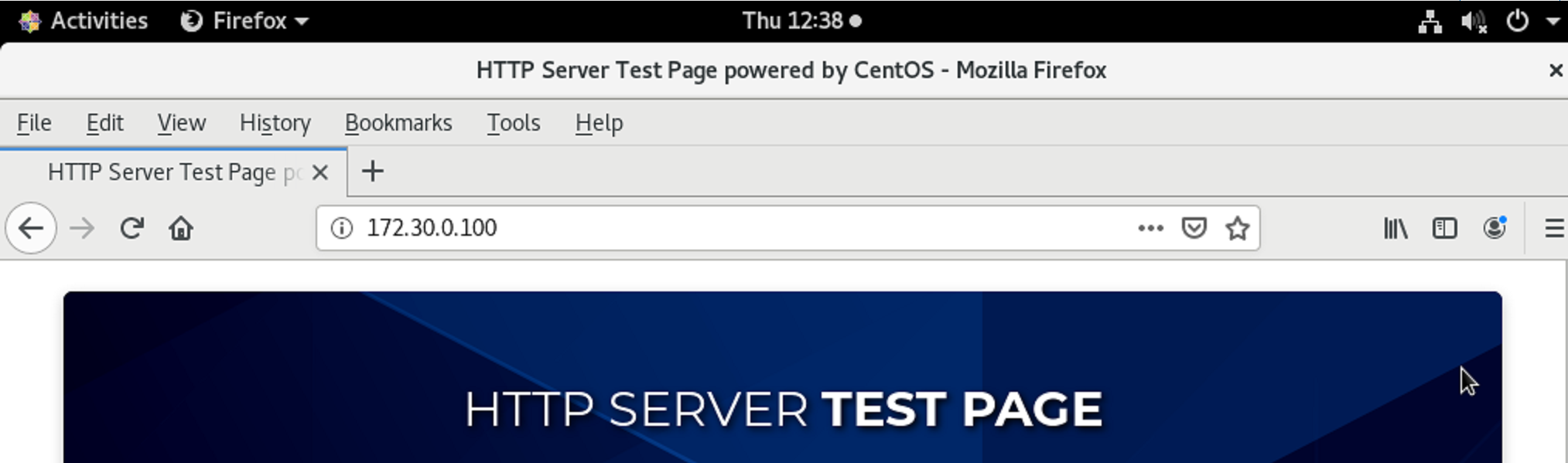
- 이번엔 반대로 WEB접속까지 해본다. 마찬가지로 정상적으로 원격지 내부에 접속이 가능하다.

'IT > ㄴ HPE & Juniper' 카테고리의 다른 글
| [JN0-650] Interior Gateway Protocols (IGPs) - OSPFv2 (0) | 2025.12.25 |
|---|---|
| Junos VLAN / LACP / RSTP / IRB / VSTP / VRRP / Cisco 연동 기본 (0) | 2025.09.23 |
| Juniper SRX 기본 Lab 구성(IP 설정 / Zone 지정 / 내부 서비스 허용 / SNAT / DNAT) (0) | 2025.09.17 |
| Junos BGP #5 기초 구성해보기 (no-export) (1) | 2025.09.08 |
| Junos BGP #4 기초 구성해보기 (AS-Path) (0) | 2025.09.04 |